Showing posts with label 3. Show all posts
Showing posts with label 3. Show all posts
Monday, June 3, 2013
How to Downgrade iOS 6 1 3 to iOS 5 1 1 Using iFaith
How to Downgrade iOS 6.1.3 to iOS 5.1.1 Using iFaith - We all have to know if Apple releases iOS 6.1.3 to fix some Bugs and need to know if iOS 6.1.3 so that it can no longer in use Eavsi0n jailbreak, for those of you who have iDevce A4 as the iPhone 3GS, 4 and iPod Touch are already Upgrades to iOS 6.1.3, you may be a little more luck because you can still do Dowgrade to iOS 5.1.1 or Tethered jailbreak using Sn0wbreeze. Why should downgrade to iOS 5.1.1. Why not to iOS 6.1.2 or lower? This caused the iOS 6.1.2 shsh files or lower have experienced Corrupt, so it can not use to downgrade to iOS 6.1.2. So maybe this is the only way is to downgrade to iOS 5.1.1 using SHSH files that exist in the Cydia server
But the condition that can downgrade to iOS 5.1.1 on iPhone 3GS / 4 and iPod Touch you. Still requires iOS 5.1.1 shsh. If you do not have the SHSH files, There is no way to be able to Downgrade iOS 6.1.3 to iOS 5.1.1.
For those of you who have iDevice with the A5 processor or higher, such as the iPhone 4s / 5 or iPad 2/3/4/Mini and already did upgrade to iOS 6.1.3, this method can not be used to perform Dowgrade to iOS 6.1.3 iOS 5.1.1, because iFaith not support the iDevice with the A5 processor or higher, even if you have iOS 5.1.1 shsh files. My advice still enjoy the current iOS, until hackers release new jailbreak tool.
if you want to downgrade iOS on iPhone or iPod, you should prepare the required
1. iFaith latest version, you can Download here
2. iREBrc7 you can Download here
3. IOS 5.1.1 SHSH Blobs file. you can requests from Cydia server, use TinyUmbrella or iFaith.4. iTunes Latest version
5. iOS 5.1.1 is compatible with your iPhone or iPod.
How to Downgrade iOS 6.1.3 to iOS 5.1.1 Using iFaith

Step 1: Open iFaith By Way, Right Click and select "Run As Administrator"
Step 2: On the screen iFaith, Select "Build * signed * IPSW w / Blobs" Then select "Browse for SHSH Blobs" Search iOS 5.1.1 SHSH file and click Open.

Step 3: Next, select "Browse for an IPSW" and Find Files Firmware iOS 5.1.1 that you download or prepared beforehand.

Step 4: Wait Until iFaith finished making a CTF file, so you just be patient enough, might use the time to 5-10 minutes.
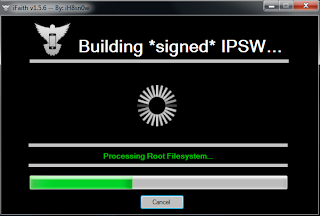
Step 5: After iFaith finished making CTF file for your iPhone or iPod, please check the file, usually stored on your computer desktop.
Step 6: Next, iFaith will automatically guide you to position your iPhone or iPod into DFU Mode. But at this moment, we do not Using iFaith to position your iPhone or iPod into DFU Mode. So, Close iFaith
Step 7: Open iREB r7 that you downloaded earlier, By Way Right Click and select "Run As Administrator"
Step 8: Once your iPhone or iPod is detected in iREB r7, On the iDevice menu options, Please Choose according to your iDevice have.
Step 9: At this Moment, you will be guided by iREB r7 to position your iPhone or iPod Touch into DFU Mode. Please Follow the instructions that show on the screen of iREB r7
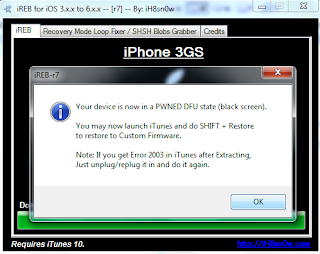
Step 10: After successfully position your iPhone or iPod Touch into DFU Mode, Close iREB r7, And Open iTunes, Now In iTunes your iPhone or iPod Touch will be detected as Recovery Mode.
Step 11: In iTunes Press and Hold down the Shift key on your computer and then click "Restore" in iTunes. Then Select the File CTF was created using iFaith, this file is usually located in your Desktop Computer.
Step 12: Please Wait Until Done Restore Process. and enjoy iOS 5.1.1
But You can Jailbreak TetherediOS 6.1.3, Please read this artitckel for it.
How to Tethered Jailbreak iOS 6.1.3 Using Sn0wbreeze
Read More..
But the condition that can downgrade to iOS 5.1.1 on iPhone 3GS / 4 and iPod Touch you. Still requires iOS 5.1.1 shsh. If you do not have the SHSH files, There is no way to be able to Downgrade iOS 6.1.3 to iOS 5.1.1.
For those of you who have iDevice with the A5 processor or higher, such as the iPhone 4s / 5 or iPad 2/3/4/Mini and already did upgrade to iOS 6.1.3, this method can not be used to perform Dowgrade to iOS 6.1.3 iOS 5.1.1, because iFaith not support the iDevice with the A5 processor or higher, even if you have iOS 5.1.1 shsh files. My advice still enjoy the current iOS, until hackers release new jailbreak tool.
if you want to downgrade iOS on iPhone or iPod, you should prepare the required
1. iFaith latest version, you can Download here
2. iREBrc7 you can Download here
3. IOS 5.1.1 SHSH Blobs file. you can requests from Cydia server, use TinyUmbrella or iFaith.4. iTunes Latest version
5. iOS 5.1.1 is compatible with your iPhone or iPod.
How to Downgrade iOS 6.1.3 to iOS 5.1.1 Using iFaith
Step 1: Open iFaith By Way, Right Click and select "Run As Administrator"
Step 2: On the screen iFaith, Select "Build * signed * IPSW w / Blobs" Then select "Browse for SHSH Blobs" Search iOS 5.1.1 SHSH file and click Open.
Step 3: Next, select "Browse for an IPSW" and Find Files Firmware iOS 5.1.1 that you download or prepared beforehand.
Step 4: Wait Until iFaith finished making a CTF file, so you just be patient enough, might use the time to 5-10 minutes.
Step 5: After iFaith finished making CTF file for your iPhone or iPod, please check the file, usually stored on your computer desktop.
Step 6: Next, iFaith will automatically guide you to position your iPhone or iPod into DFU Mode. But at this moment, we do not Using iFaith to position your iPhone or iPod into DFU Mode. So, Close iFaith
Step 7: Open iREB r7 that you downloaded earlier, By Way Right Click and select "Run As Administrator"
Step 8: Once your iPhone or iPod is detected in iREB r7, On the iDevice menu options, Please Choose according to your iDevice have.
Step 9: At this Moment, you will be guided by iREB r7 to position your iPhone or iPod Touch into DFU Mode. Please Follow the instructions that show on the screen of iREB r7
- Press and Hold the Power / Sleep for 3 Seconds
- Press the Home button without releasing the power button / Sleep for 10 seconds
- Without releasing the Power button Release the Home button (Home button remains in the press) for 15 Seconds
Step 10: After successfully position your iPhone or iPod Touch into DFU Mode, Close iREB r7, And Open iTunes, Now In iTunes your iPhone or iPod Touch will be detected as Recovery Mode.
Step 11: In iTunes Press and Hold down the Shift key on your computer and then click "Restore" in iTunes. Then Select the File CTF was created using iFaith, this file is usually located in your Desktop Computer.
Step 12: Please Wait Until Done Restore Process. and enjoy iOS 5.1.1
But You can Jailbreak TetherediOS 6.1.3, Please read this artitckel for it.
How to Tethered Jailbreak iOS 6.1.3 Using Sn0wbreeze

Monday, April 8, 2013
Samsung Star 3 Duos Price in India Dual SIM Mobile Samsung Star 3 Duos with Touchscreen Display
Samsung Mobiles announces Samsung Star 3 Duos Mobile with Dual SIM & Touchscreen Features. It is another Star Series mobile by Samsung. It will be available in Black & White Colors. It has GSM Networks support on both SIM with Dual Standby feature. Like Samsung Star 3 it comes with same features like 3 Inches Touchscreen Display, Touchwiz Lite UI, 3.2 MP Camera, Multi Format supported Audio Player and Video Player, FM Radio, 16GB Expandable Memory, Wi-Fi, GPRS, EDGE, Bluetooth, WAP, microUSB Port and more.
Samsung Star 3 Duos Price in India:
Touchscreen Dual SIM Mobile Samsung Star 3 Duos Price is not revealed yet in India. (Coming Soon Mobile)
Colors:
- Ceramic White
- Onyx Black
 |
| Samsung Star 3 Duos |
Samsung Star 3 Duos Features & Specifications:
- Dual SIM (GSM+GSM)
- Dual Standby
- 3.0-Inches TFT Touchscreen Display
- 280 x 320 pixles screen resolution
- TouchWiz Lite UI v2.0
- 3.2 MP fixed focus camera
- Camera Features: Single, Smile shot, Panorama, Timer shot
- Quality Video Playback / Recording
- Multi format Music Player
- Multi format Video Player
- Audio Player supported format MP3/AAC/AAC+/eAAC+/WMA
- Video Player supported format MPEG4, H.263
- FM Radio with recording
- 3.5 mm jack
- Network: 2G
- 20MB Internal memory
- up to 16GB external memory
- EDGE
- GPRS
- Wi-Fi
- Bluetooth
- microUSB port
- Accelerometer Sensor
- WAP
- SMS/MMS
- Emails
- Social Networking
- Instant Messaging
- Samsung Apps
- Samsung chat ON
- Document viewer
- MSN, Yahoo, Google Talk, Facebook Chat
- NetFront 4.2 Bowser
- EAS Push E-mail
- Opera Mini Browser
- Google Maps
- SNS integration
- 1000 mAh Battery
- Talk time: up to 5 hours
- Standby: 200 hours (Approx)
- Dimensions : 58x102x11.5 mm
- Weight: 95 grams
Friday, April 5, 2013
Samsung Galaxy Tab 3 Plus 10 1 User Manual Guide Pdf
Samsung Galaxy Tab 3 Plus 10.1 User Manual Guide Pdf - Quoted from Ubergizmo, Wednesday (02/06/2013), Galaxy Tab GT-P8200 Plus rumored to be slid in the near future. The device will carry the Nexus screen resolution equivalent to 10 - 2560x1600.
 |
| Google Images |
Samsung Galaxy Tab GT-P8200 3 Plus will be available in a number of countries in the Blue Continent this year. The device is expected to show off the mat Mobile World Congress (MWC) later this month. The device will be combined by the Galaxy Tab 10.1 and Galaxy Note 3 8.0.
Meanwhile, through the scores posted on the AnTuTu, Galaxy Tab Plus managed to achieve a score of 13.377. Then the score was referring to the 10-inch screen that spurred Exynos dual-core processor 4 with 1.7 GHz clock. Running on the Android operating system 4.2 Jelly Bean, the device is also equipped with WiFi, Bluetooth, audio, and supported 3G and 4G LTE networks.
Galaxy Tab is equipped with 3 possible 1 or 2GB of RAM. As for the media storage, this tablet will reportedly be available in two versions, the 16GB and 64GB.
Sorry, Samsung Galaxy Tab 3 Plus 10.1 User Manual Guide Pdf Is Not Available Yet Now
New iPad 3 video review

Behind this screen, quite literally, is a revised display technology. Its believed to be a form of the Super High Aperture (SHA) process that allows incredibly tight packing of the thin-film transistors that comprise a display matrix. Apple as ever is tight-lipped about the minutiae of internal technologies, but we believe the first raft of new iPads are taking Samsung-made screens, with LG and Sharp mooted to contribute as production is ramped up.
The irony of Apples Korean arch-enemy supplying Cupertino with the very component that will push the iPad to a new level beyond the Android copycats is difficult to miss.
Squeezing four times as many pixels into the same 9.7in display gives a density of 264ppi. Thats lower than the iPhones 326ppi, but when viewed on a new iPad at a typical reading distance (Apple quotes 15in, which we confirmed is our comfort zone) the Retina effect is restored. Mind you, weve peered closer, much closer, and still cant see any individual pixels. Viewing most content on-screen, its like looking at a glossy magazine, not a computer screen.
To achieve this effect has taken bleeding-edge screen tech, more LED backlighting, and bigger batteries to drive it all.
Which is why the battery has been expanded by 70%, from 25Wh to 42.5Wh, to maintain Apples class-leading battery life. The company quotes 10 hour lifespan again. For the iPad 2, wed suggest that figure was slightly conservative, but maybe one thats closer to the case for the power-hungrier third-gen iPad.
Battery testing mobile devices remains an inexact science with too many variables to replicate a ‘typical usage pattern. In three days of testing, we had to charge the unit twice, where an iPad 2 may have lasted on a single charge. But our usage of the new iPad was perhaps far from average – in essence caning the device with near-constant use.
Via; pcavistor
Subscribe to:
Posts (Atom)